
Forecast a catalog product as a range, not a checkout number
TrendMetric Research7 min read
A single checkout number is the wrong output for catalog demand. Forecast is TrendMetric’s demand-range workspace for a product or market that already has stored history. You pick a subject and a horizon — 30D, 90D, 6M, 1Y, or 5Y — and get a volume-first band, confidence, stance, and a Scale / Test / Watch / Caution recommendation. It is not a paid search-any-keyword API, and Track Forecast is not live.
The chart is search-demand volume, not promised revenue. Low and high bounds make uncertainty visible. Stance (Bullish, Neutral, Bearish) and the move (Scale, Test, Watch, Caution) are research language from stored history, seasonality, and competition. If history is thin, confidence drops or a limited-confidence flag appears. That is a reason to Test or Watch — not a reason to invent a tighter band.
This article is the range pass after you already have a catalog SKU. It is not a media plan and not an inventory model. If you still need the board shortlist, start with how to find trending ecommerce products. If you are deciding whether ads are even a test, use validate a product idea before ads.
What the engine is allowed to use
Forecast reads stored monthly history and the monthly market board. It does not invent missing months. It does not draw a pretty curve from 30D and 90D percentages. If history is missing, the workspace says so. You can forecast a catalog product or a catalog market, including a country view that uses stored country volumes. You cannot type an arbitrary keyword outside the catalog.
Pair Forecast with VolumeScore™ when ranking products, and with Tracked when you want 7D / 30D change from the day you started watching. Those are different clocks. Forecast looks forward from stored history. Tracked starts the day you save the row.
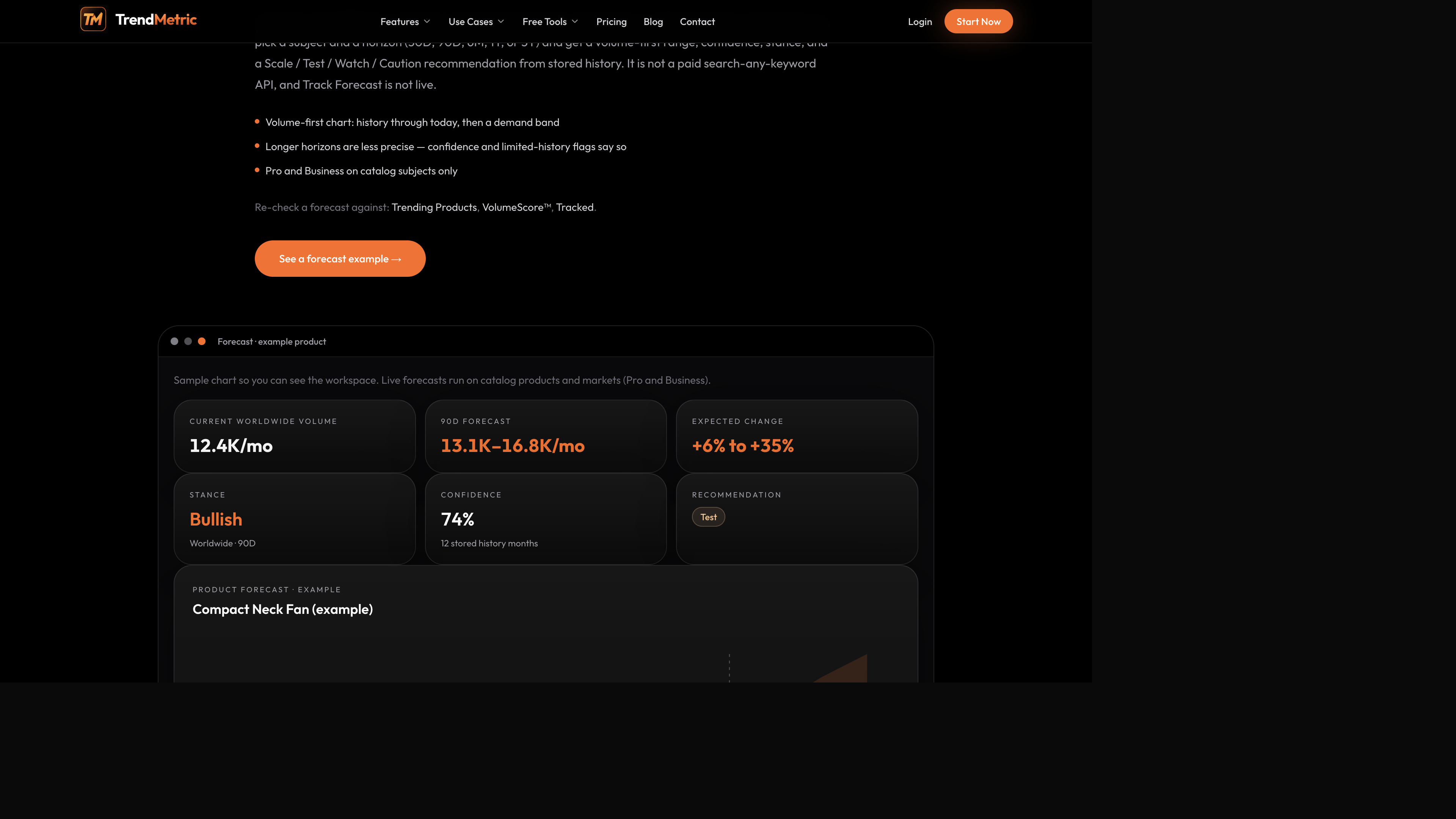
A practical example: Compact Neck Fan on a 90D horizon
The workspace example is a Compact Neck Fan / Portable Neck Fan style widget: current volume, a 90D demand range, stance, confidence, and a Test recommendation. Treat it as a teaching surface, not as live catalog output and not as a sales promise. The useful read is the shape of the widget — a band, a stance, a confidence figure, and a move — not a single midpoint you could paste into a purchase order.
On a 90D horizon the band is wide enough that seasonality and competition still show. Test means the range is usable but you should not concentrate spend. Scale would mean stored history still looks supportive on that horizon — not that ads will be cheap. Watch means keep the SKU on a list until the series is clearer. Caution means the stored picture does not support spending to learn.
The example widget is labeled as an example for a reason. Do not copy its midpoint into a purchase order, and do not treat its confidence figure as a hit rate on checkout. Use it to learn the layout — current volume, band, stance, confidence, recommendation — then run Forecast on a live catalog row you already found. If the live series is thin, limited confidence appears. That flag is the product working.
How to read the widget without lying to yourself
- Current volume is stored demand at the selected geography — Worldwide or a country slice, never both added.
- The 90D range is low–high expected demand, not a checkout or contribution-margin model.
- Stance is Bullish, Neutral, or Bearish from stored history. It is not a bid strategy.
- Confidence and limited-confidence flags tell you whether the series is thick enough for a loud call.
- The recommendation on the example widget is Test. That is a research suggestion, not permission to scale inventory.
The six-pass forecast workflow
Use this when a catalog row already survived VolumeScore™, competition, and the market size check. The point is a stance you can defend, not a fake precision point.
- Confirm the subject is on Trending Products or Trending Markets. Search Product outside the catalog is Coming Soon.
- Set the country you actually sell. A worldwide range and a US range are different views. Do not average them. Brand owners should match the forecast country to the project country.
- Start on 30D or 90D. Those horizons stay close enough to stored months that the band is still a research tool. Open 6M, 1Y, or 5Y only when you need a wider envelope — and expect precision to fall off.
- Read the band before the label. If the low and high disagree by a lot, the midpoint is not a plan. See how to read VolumeScore™ on the same SKU so the rank and the range sit in one note.
- Use Scale / Test / Watch / Caution as how aggressively to treat the thesis. If conversion or ads fail, revenue will not “follow the line.”
- Track the SKU the day you decide it matters. Track Forecast is not live. Optional Tracked emails are opt-in in Settings on a paid plan.
Horizons: 30D and 90D first, then the long band
30D is the test window. Use it when you are about to buy a sample or a small ad set and need to know whether stored demand still looks supportive this month. 90D is the planning window: wide enough to see seasonality start, tight enough that a Caution flag still means something.
6M, 1Y, and 5Y are envelopes, not schedules. Longer horizons are less precise on purpose. If confidence is limited, do not “fix” the band by picking the optimistic edge. Media buyers should still run the market size check on Who’s Scaling before they treat a Bullish 5Y as a reason to raise budgets.
Country and forecast
Run the forecast in the country you actually sell. Country views reuse stored country volumes. Worldwide stays the full catalog picture. Do not add a country range on top of Worldwide and call it extra demand — the same rule as country vs Worldwide.
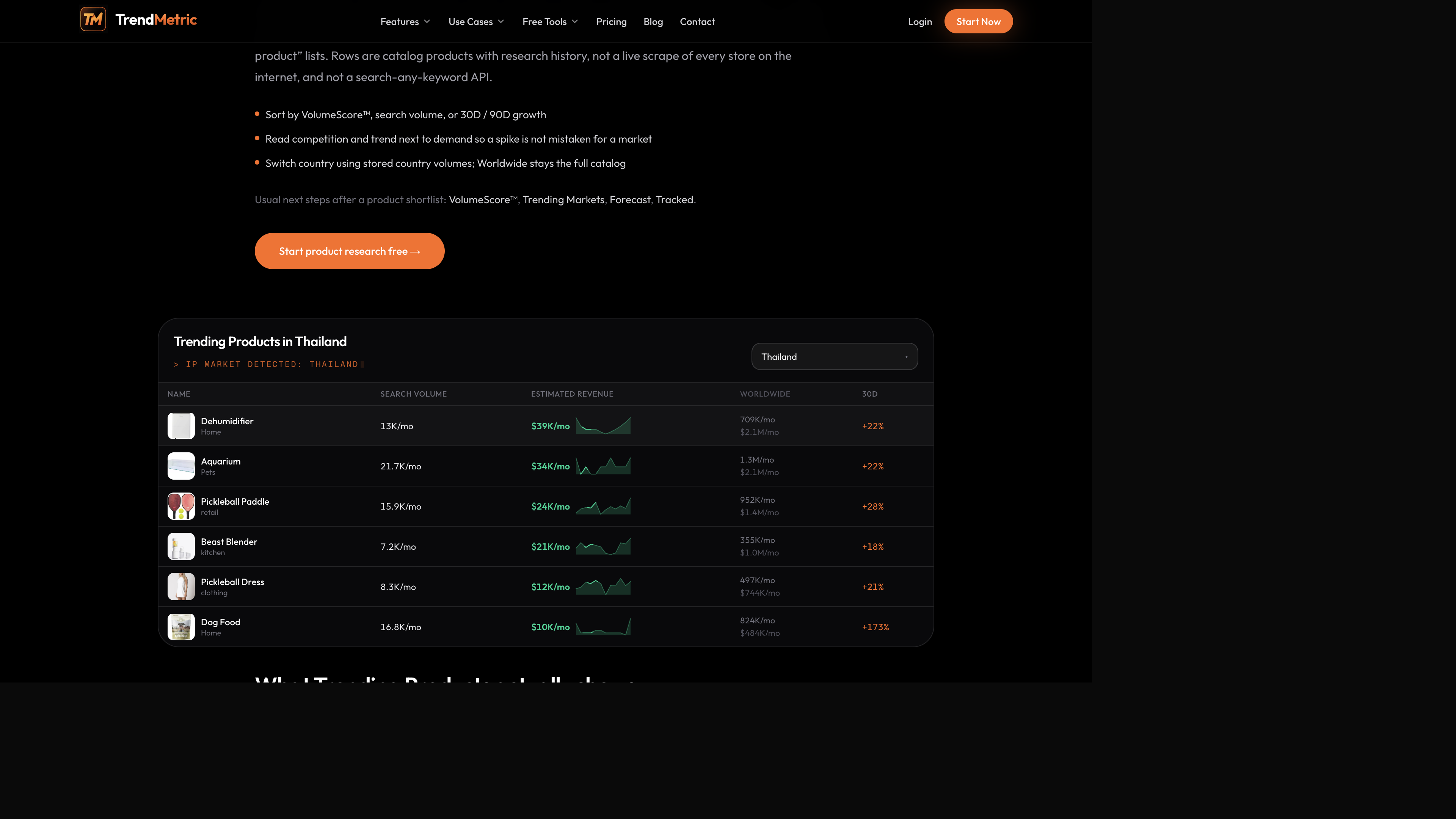
If you research for clients, one country per brief. Forecast summaries inside a project use the project country so the team does not mix geographies in the same note. A Thailand product-table row and a Worldwide forecast are different views of the same SKU. Write which one you ran.
VolumeScore™ on the same SKU is still the board rank, not a second forecast. Read how to read VolumeScore™ next to the band. A high score with a Caution stance is a crowded keyword whose stored future does not support spending to learn. A mid score with a Test stance is often the honest brief.
What Forecast will not do (on purpose)
- It will not accept an arbitrary keyword outside the catalog.
- It will not attach email alerts to forecast moves. Track Forecast is not shipped.
- It will not predict ROAS, CPA, landed cost, or whether Meta will approve the ad.
- It will not fill missing months so the curve looks complete.
That constraint is the method. You forecast what is stored, then you decide what to test with your own offer and suppliers. Product researchers use the range as a second opinion next to VolumeScore™. There is a one-shot public product forecast preview on catalog items; the workspace is where you change horizon and country.
After the range: Track, don’t backfill
When the stance is Test or Scale, Track the product so later 7D / 30D change has a start date. When the stance is Watch or Caution, Tracking still helps — you get an honest clock if you come back. Forecast and Who’s Scaling are Pro — see which plan you need.
Tools that sit next to the range
If you already have a test budget in mind, the public ROI calculator and ROAS break-even calculator are arithmetic — they do not read TrendMetric forecasts. Use them after the catalog pass, not instead of it.
Dropshippers who want the SKU shortlist first should stay on dropshipping product research until competition and 90D are in the note. Then forecast. Then Track. That order is the whole product.
Related articles
FAQ
- Can I forecast any keyword I type?
- No. Forecast runs on catalog products and markets only. Search Product outside the catalog is Coming Soon. If the SKU is missing, Forecast cannot invent it.
- Is the forecast a sales guarantee?
- No. It is a modeled demand range from stored history, plus stance and a research recommendation. It is not observed checkout, inventory advice, or ad ROAS.
- Why are long horizons less precise?
- More time means more room for seasonality and competition to move. Confidence and limited-history flags are there so the band does not look tighter than the series supports.
- Is Track Forecast live?
- No. You cannot attach tracking or email alerts to forecast moves. Track a product or market instead so 7D / 30D starts on the save date.
- Which plan includes Forecast?
- Pro and Business. Starter has Trending Products and Trending Markets without Forecast. There is also a one-shot public preview on catalog items.