
Worldwide vs country demand: how TrendMetric country switching actually works
TrendMetric Research8 min read
Country switching is a stored-data feature, not a live Ads API call on every click. When you pick a country in Trending Products, Search Volume and Estimated Revenue read that country’s stored volume when it exists. If the request finishes and there is no figure, the cell says Unavailable.
Operators get this wrong in two directions. They brief a local campaign off Worldwide TAM, or they add a US number on top of Worldwide and call it extra demand. Both notes are false. Worldwide is the full catalog picture. A country is a slice of the same stored history.
This article is the geography pass. Use it before you find trending products for a ship-to market, before you validate a product idea, and before you compare estimated revenue and MarketScore™. How to read VolumeScore™ still applies: the score is a catalog rank, not a second number you can add across countries.
Worldwide is not a country
Worldwide is the default full view. A selected country is a slice. Large countries usually look bigger than smaller ones because stored demand is larger, not because TrendMetric is “boosting” them. Small countries can look thin even when the Worldwide row looks busy. That is the feature working.
Start on Worldwide when you do not yet know where you will sell. Switch as soon as the shipping country or the ad account country is known. If you research for clients, pick one country per brief. Ecommerce agencies should put that country on the project so notes and later forecasts do not silently mix geographies.
Do not double-count
- Do not add a country Search Volume on top of Worldwide and call it extra demand.
- Do not add parent-market revenue to a submarket in the same country.
- Do not mix a US product view with a worldwide market TAM in the same note.
- Do not average a Worldwide Forecast with a country Forecast and call it the real number.
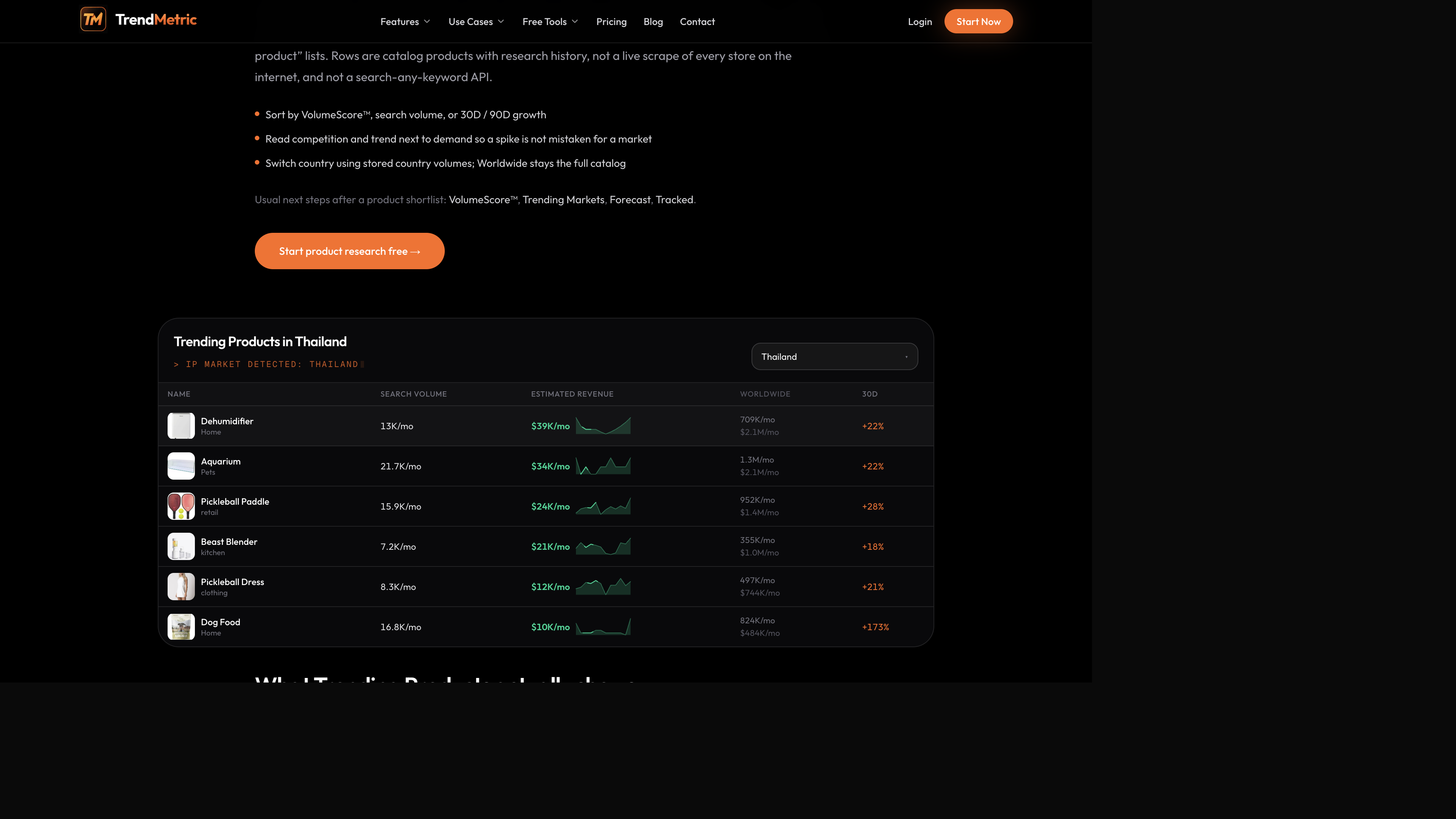
The Thailand product table is the clearest picture of the rule. Dehumidifier, aquarium, and pickleball-adjacent rows show local Search Volume and Estimated Revenue next to a Worldwide column. Read across the row. If local is thin and Worldwide is large, you have a geography problem, not a hidden pile of extra demand you can unlock by adding the cells.
How to read a country board without lying to yourself
A dehumidifier-style home SKU is often a local-climate story. Worldwide interest can exist while the country you ship barely searches it — or the reverse. Write the country first. If the local cell is Unavailable after the request finishes, that is a stored miss, not a loading spinner. Do not fill the gap with the Worldwide figure and hope.
A pickleball-adjacent row can show a loud 30D on a country slice. 30D is a short window on that slice, not proof the sport “went global.” Pair it with 90D and with the Worldwide column. If you only sell into that country, Worldwide is context for saturation and suppliers — not extra TAM.
A portable neck-fan style SKU on the product intelligence card shows VolumeScore™, monthly Search Volume, and modeled Estimated Revenue for the selected geography. Switch the geography before you screenshot the card. A Worldwide tile is not the same brief as the same SKU on a smaller stored country.
Markets follow the same slice rule
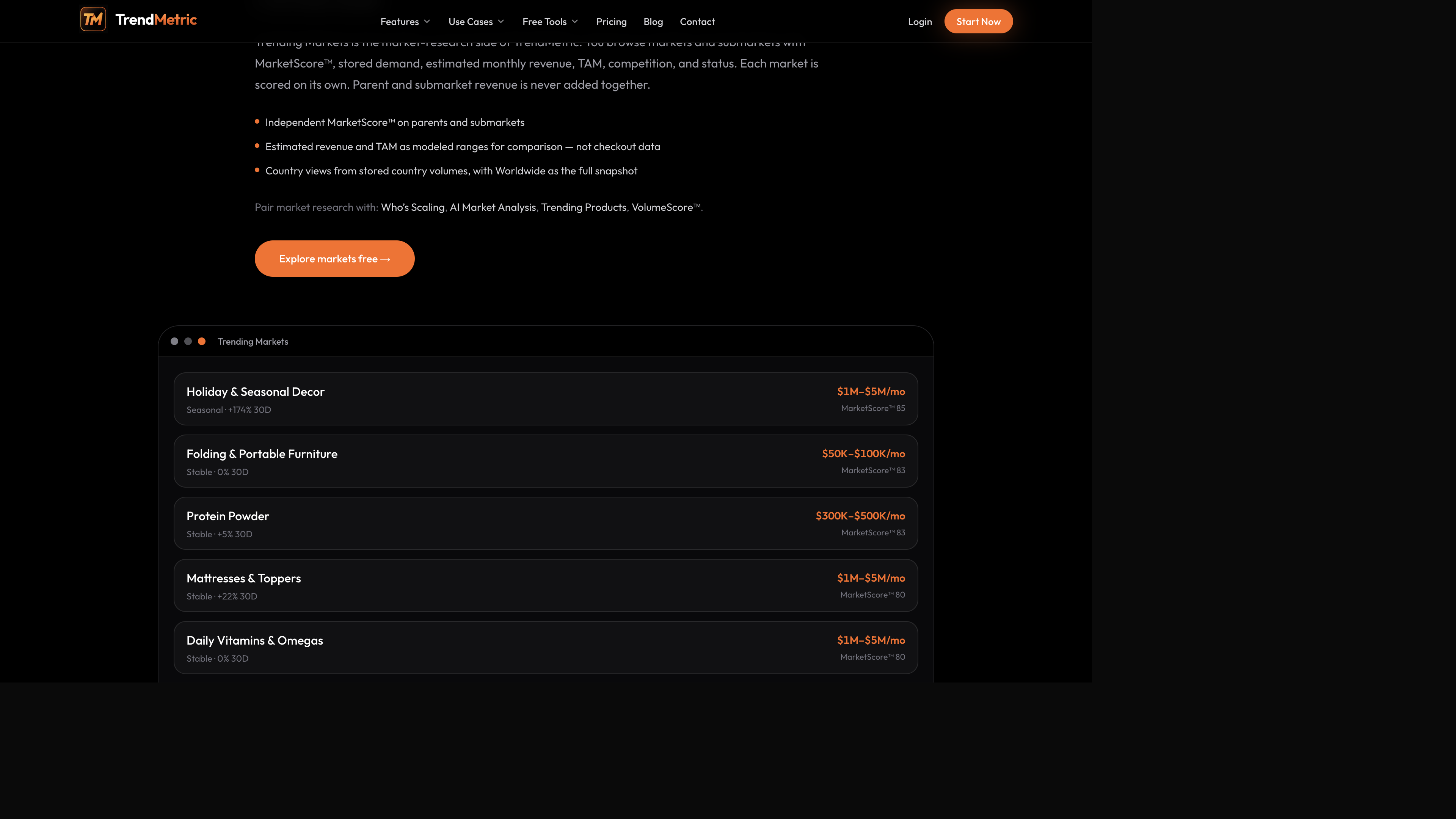
On Trending Markets, switching country reuses stored country volumes. Worldwide uses stored market tiers. A country uses finer country buckets and the same TAM ceiling. Protein powder, holiday decor, and folding furniture can change band when you change country. That is not TrendMetric shrinking the aisle to punish you. It is the slice.
Who’s Scaling uses the same helpers. The revenue floor can differ from Worldwide. A market that looks like it is scaling on the full view can fall off a country view if stored local demand does not clear the floor. Run the cut in the country you will spend in.
Worked examples: neck fan, dehumidifier, protein powder
Portable neck fan: open the product intelligence card after you set the country. VolumeScore™ is still the catalog rank. Search Volume and Estimated Revenue follow the geography. If you screenshot the card on Worldwide and spend in one country, the brief is already wrong — even if the ring looks mid-pack and familiar.
Dehumidifier on the Thailand table: local Search Volume and Estimated Revenue sit next to Worldwide. Read both. If you ship only to that country, the local cell is the decision. If you are an agency comparing expansion, write two notes, not one blended TAM. Aquarium and pickleball rows on the same table are the same exercise with different 30D noise.
Protein powder on Trending Markets: switch the market board to the same country as the product board before you compare the parent to a child accessory. A Stable Worldwide band does not authorize a local spend plan. Do not add the market range to the SKU’s estimated revenue in either geography.
Projects and Tracked keep the geography honest
If you research with a team, set the Projects country so notes and forecast summaries do not silently mix geographies. Tracked items also store the country you were on when you saved them. That is why you should switch first, then Track — not Track on Worldwide and later pretend the 7D window was local.
The product-table shots used for projects in this series are the same Thailand Trending Products view: country switcher, local columns, Worldwide still visible. Treat that as the reminder. A project named “US — neck fans” that contains Thailand screenshots is how briefs go bad.
Cost of switching country
The product board loads country volumes for the current page, then caches them. Changing country does not download the entire 2,000+ product catalog in one shot. Markets that already include country volumes on the list item switch in the client. That is why Unavailable is a finished miss, not a timeout you should refresh until a number appears.
If you page through the catalog after switching, new rows load that country’s stored volumes the same way. Do not assume page one is Thailand and page two is still Worldwide because you forgot to look at the switcher.
A geography pass you can run on every brief
Use this before you shortlist, validate, or forecast. Five minutes. One country. One sentence in the note that names the geography.
- Name the country of the ad account or the ship-to market. If you do not know it yet, stay on Worldwide and write “geography unset.”
- Open Trending Products and switch to that country before you sort or filter.
- Read Search Volume and Estimated Revenue as local. Use the Worldwide column as context only.
- If a cell says Unavailable, record “no stored country figure.” Do not substitute Worldwide.
- Open Trending Markets in the same country. Compare parent and child independently. Do not add TAM.
- Put the country on the project. Track products and markets only after the switch. Forecast (Pro) in the same country — do not average ranges.
Forecast and Who’s Scaling inherit the slice
If you have Pro, run Forecast in the same country as the brief. A Worldwide range and a country range are different views. Limited confidence on a thin country series is a reason to Watch, not a reason to substitute the Worldwide band. Track Forecast is not live — you cannot attach alerts to the range.
Who’s Scaling applies a revenue-and-momentum bar on the same stored volumes. Worldwide uses a higher floor than a single-country view. If a protein-powder market looks like it is scaling Worldwide and disappears on the country you sell, believe the country cut. Percentage growth on a tiny local base is exactly what the bar is there to ignore.
After the country is set
Sort by VolumeScore™ and read the local columns. Product researchers should refuse to mix geographies in one sheet. Media buyers should refuse to brief a local campaign off Worldwide TAM. Brand owners should match Forecast country to project country.
If you only needed the catalog this week, Starter is enough. Who’s Scaling, AI Market Analysis, and Forecast stay Pro and should inherit the same geography. Compare pricing. The public ROI calculator still will not read a country tile — it is arithmetic after the catalog pass.
Create a free account to try Worldwide first, then switch. A dehumidifier that looks busy Worldwide and thin in the country you ship is a Skip for that account. A neck-fan card shot on the wrong geography is a bad brief. The workspace will not add the two views for you. Neither should you.
If you take one habit from this article, make it this: name the country in the first line of every research note, then refuse to paste a Worldwide tile underneath it. Catalog research stays useful only when the geography stays single.
Related articles
FAQ
- Is country switching a live Google Ads or Meta API call?
- No. It reads stored country volumes. When you pick a country, Search Volume and Estimated Revenue use that country’s stored figure when it exists.
- Should I add country Search Volume on top of Worldwide?
- No. Worldwide is the full catalog view. A country is a slice. Adding them double-counts interest.
- What does Unavailable mean on a country cell?
- The country request finished and there was no stored figure. It does not mean the row is still loading.
- Does changing country download the entire product catalog?
- No. The product board loads country volumes for the current page, then caches them. Markets that already include country volumes on the list item can switch in the client.
- Which plan do I need to switch country?
- Starter, Pro, and Business all use country switching on the live catalogs. Who’s Scaling, AI Market Analysis, and Forecast are Pro and should be run in the same country as the brief.