
How to read VolumeScore™ without treating it as a sales forecast
TrendMetric Research8 min read
VolumeScore™ is the rank that sorts Trending Products. It is a 0–100 composite built from stored catalog signals: demand, growth, competition, seasonality, and related factors. A high score is a starting point for research. It is not a promise that a product will sell, clear ads, or stay cheap to source.
Operators treat the ring as a verdict because it looks like a grade. It is not. The useful habit is: sort once, then read the columns that explain the sort. Search Volume, Estimated Revenue, trend, competition, and 30D / 90D are the explanation. If you only keep the number, you will confuse a crowded keyword with a clean one.
This article is the score-first pass. For the demand-first board workflow, read how to find trending ecommerce products. For what the board will and will not invent, read Trending Products is catalog research. If you already have a SKU and need a go / no-go, use how to validate a product idea.
What VolumeScore™ is built from
The workspace only scores products that already exist in the live catalog and meet catalog rules, including a usable image. It does not scrape every store on the internet, and it does not invent a row because a TikTok SKU went viral this morning. VolumeScore™ compresses the stored series so you can compare rows on one scale.
- Demand (25%) uses log-scaled monthly search volume as a quality-of-interest signal.
- Growth (20%) blends 30D and 90D so a short spike does not dominate the rank.
- Consistency (15%) penalizes a noisy series.
- Competition (15%) rewards a less crowded field. High competition can still score well if demand is strong — that is a different bet, not a green light.
- Seasonality (10%) prefers steadier year-round demand over a sharp calendar peak.
- Momentum (15%) compares recent months with the prior stretch on the same series.
Those factors are weighted and clamped to 0–100. You should still read the raw columns. Two SKUs can share a mid-40s score and be opposite tests: one is a cooling gadget with Medium crowding, the other is a thin accessory under a large supplement aisle.
How to use the score on the board
Filter or sort Trending Products by VolumeScore™ when you want a first pass. Then stop treating the sort as the decision. Cut rows you would never advertise: Search Volume too thin to staff, Cooling plus High competition with no reason to fight it, or a 30D spike on a flat 90D.
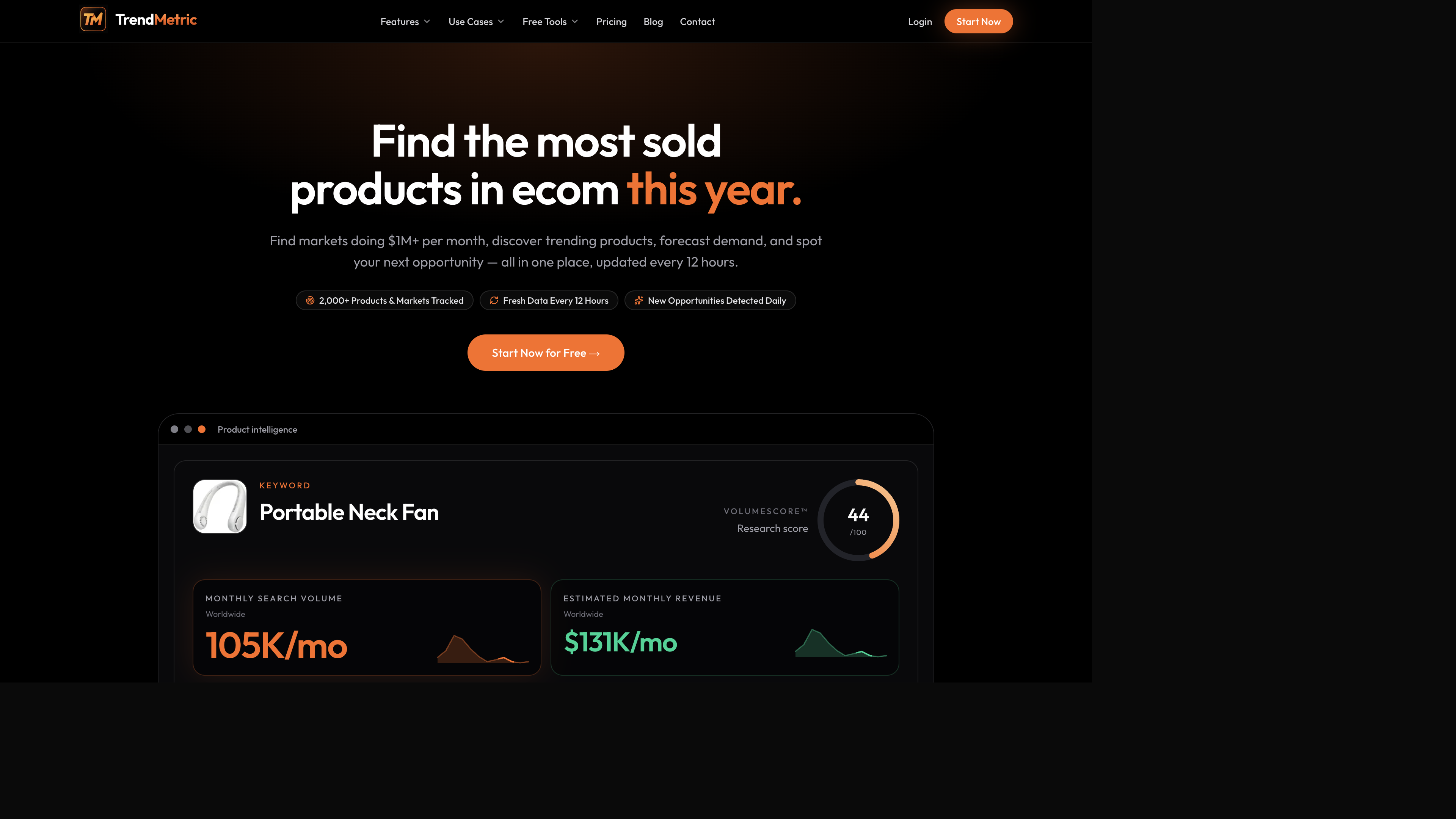
A portable neck-fan style row is a good teaching example because the intelligence card makes the split obvious. The ring tells you where the SKU sits on the catalog scale. The Search Volume tile tells you whether people already look for it. The Estimated Revenue tile is modeled — useful for comparison, not a checkout total. Write the three together. Then open trend and competition on the row.
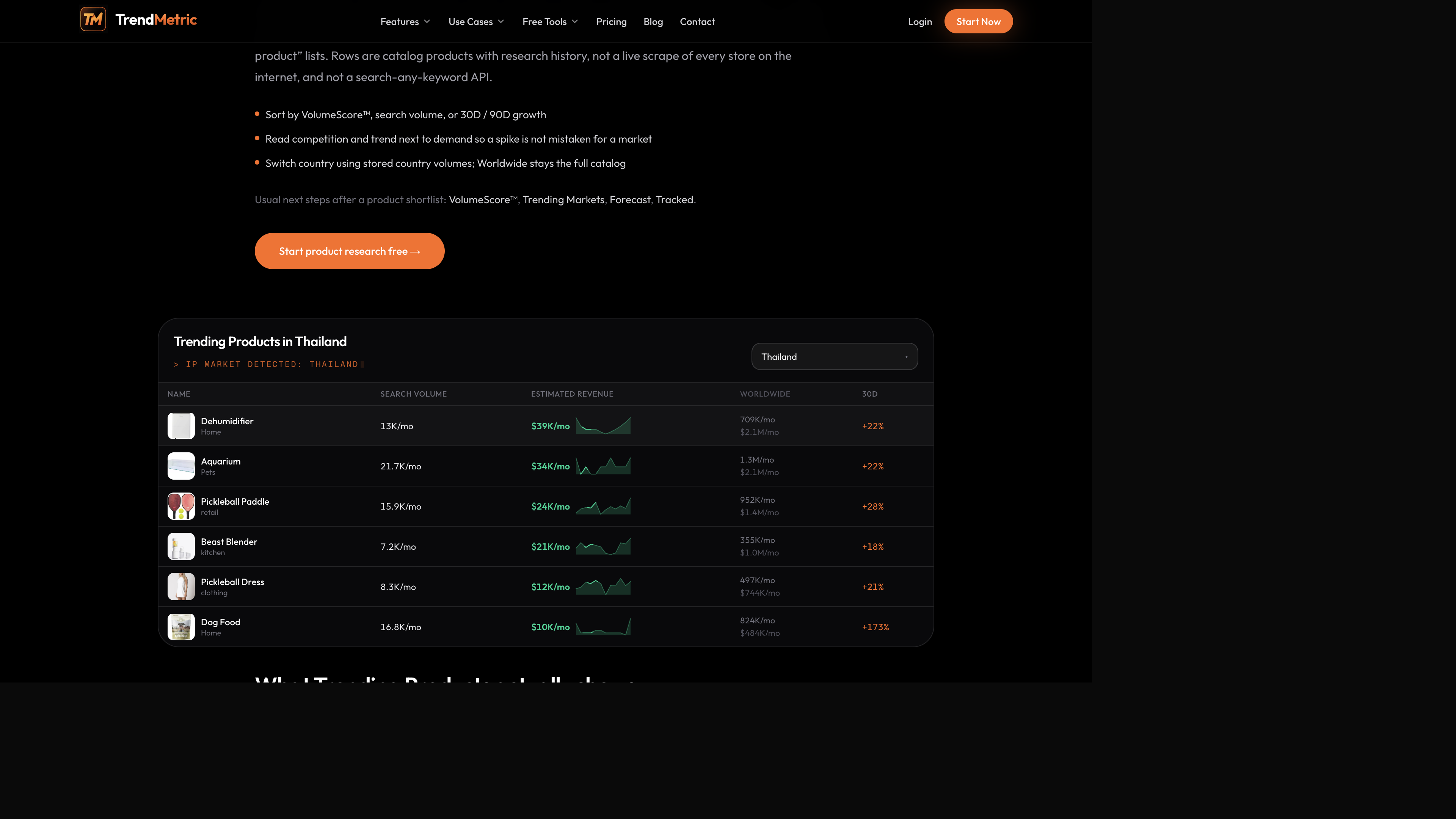
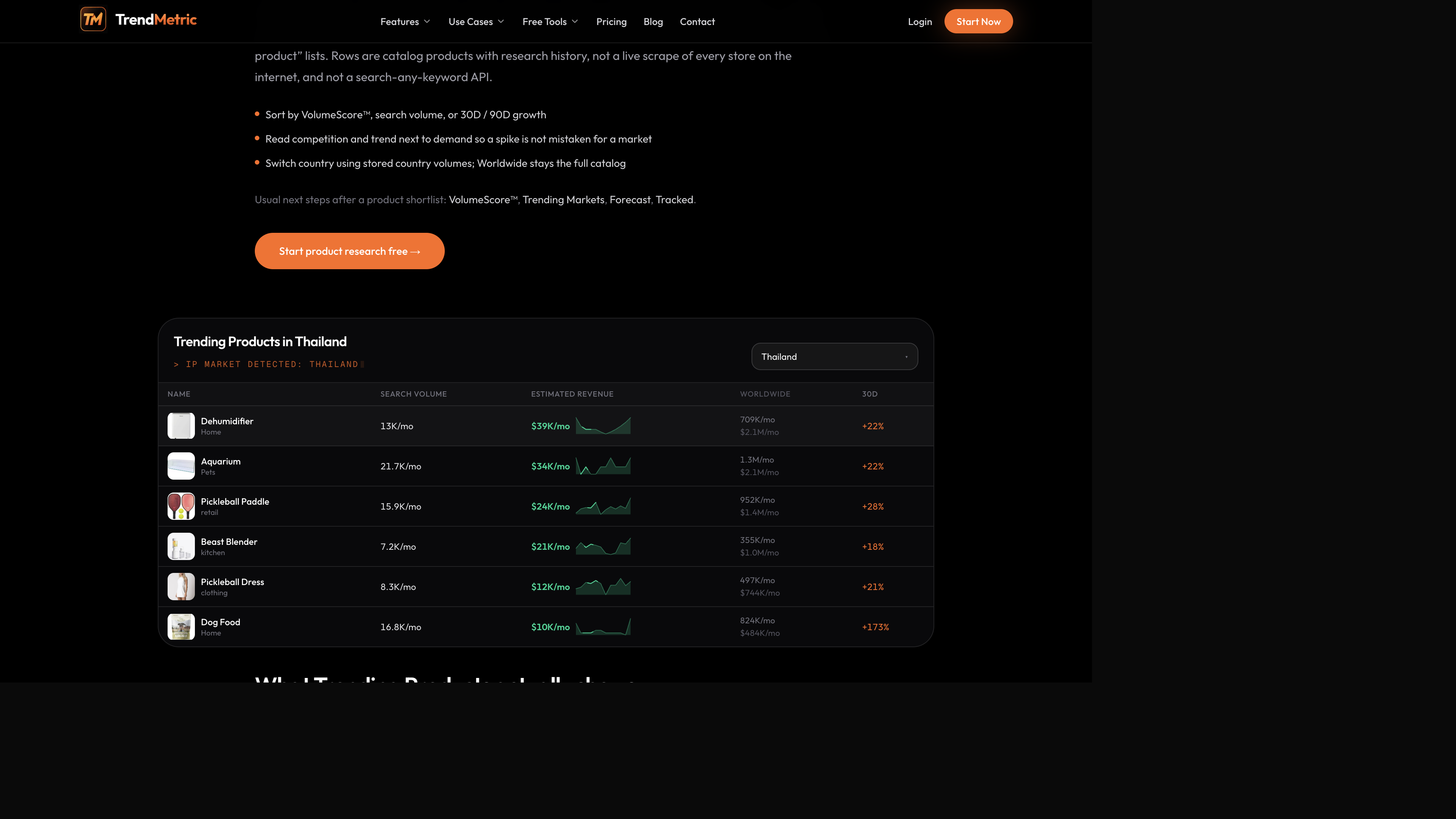
On a country board — Thailand is the view in the product-table shots — you will see dehumidifiers, aquarium kits, pickleball paddles, and similar catalog SKUs with Search Volume and Estimated Revenue on the local slice and Worldwide still on the row. VolumeScore™ still ranks the catalog product. Do not invent a second score by averaging Worldwide and the country.
A high score with High competition
That combination usually means the keyword already has demand and a crowded field. You can still test it. Do not treat the score as permission to buy inventory at scale. Dropshippers lose money when they enter after ads have already crowded a keyword. The score did its job: it put the row near the top so you would notice the crowding.
A mid score with Rising trend
Rising describes stored history. It is not a guarantee that demand will keep rising. Pair it with 90D so a one-week jump is not mistaken for a durable market. A pickleball-adjacent SKU can look Rising on 30D and ordinary on 90D. That is a Watch list item until the longer window agrees — or until you have a reason to run a small Test.
A high score with Cooling trend
Cooling plus a strong rank usually means the series was large and is now fading. That is not automatically a Skip. It is a different brief: you are buying leftover demand, not discovering an aisle. Write Cooling in the note. If 90D is already down, do not staff a launch as if the peak is still ahead.
Country views do not add extra Worldwide demand
Switch country when you need a local read of Search Volume and Estimated Revenue. Country figures come from stored country volumes. Worldwide stays the full catalog view. Do not add a country figure on top of Worldwide and call it extra demand. See Worldwide vs country demand.
VolumeScore™ is still the catalog rank. A SKU that looks mid-pack Worldwide can look more or less interesting once you read local Search Volume. That is why the Thailand table keeps both columns. A dehumidifier row with a large Worldwide figure and a thinner local cell is a country question, not a scoring bug.
Seasonality is a penalty, not a holiday badge
Seasonality is 10% of the composite. Year-round demand scores higher than a sharp calendar peak. That is why a holiday-decor adjacent SKU can look loud in November and still sit mid-pack on VolumeScore™: the rank is trying not to mistake a seasonal spike for a durable aisle.
Read seasonality next to 30D / 90D. If the SKU is Seasonal and 30D is up because the calendar turned, you are not looking at a new market. You are looking at the same peak as last year. Write the month in the note. Brand owners already sitting in that aisle can still test a variant. Dropshippers who arrive at the peak are buying leftover demand.
Neck fans and dehumidifiers are the other side of the same rule. Climate-tied demand can look strong in the months people search it and ordinary the rest of the year. VolumeScore™ discounts extreme seasonality on purpose. If you only sort the board in the hot month, you will over-rank calendar SKUs and under-rank steadier ones.
VolumeScore™ is not MarketScore™
MarketScore™ lives on Trending Markets. It ranks markets and submarkets from stored demand, momentum, and competition. A protein-powder market can look large and Stable while a child accessory on Trending Products looks thin. Do not transfer the market rank onto the SKU. Estimated revenue and MarketScore™ covers the parent / child rule: never add TAM twice.
Brand owners hit this when a SKU sits in a tight intent inside a larger aisle. The aisle’s MarketScore™ is context. The product’s VolumeScore™ is the row you are deciding on. Write both. Add neither.
A six-step read that keeps the score honest
Use this when you have 15 minutes and a category in mind. The output is three rows you would actually open — not a screenshot of the top of the sort.
- Open Trending Products. Sort by VolumeScore™ so the board has one consistent rank.
- Read Search Volume next to the score. Drop rows you would never advertise, even if the ring looks strong.
- Read competition. High plus high demand is a crowded test. Low plus thin volume is usually not a market.
- Read 30D next to 90D and the trend label. Keep Rising + thin 90D on a Watch list.
- Switch to the country you sell. If a cell says Unavailable, the country request finished with no stored figure.
- Open three products. Write VolumeScore™, Search Volume, competition, and trend on one line each. Then decide what deserves validation.
What VolumeScore™ will not replace
It will not tell you contribution margin, creative fatigue, or whether a supplier can ship. It will not score a keyword that is not in the catalog. Search Product outside the catalog is Coming Soon. Spy on Store is Coming Soon. Forecast is a separate demand range from stored history, and it is Pro. Tracked is a separate watch list whose 7D / 30D clock starts when you save the row.
None of those tools replace the score, and the score does not replace a test. If you need a go / no-go, keep going through validate a product idea in the country you sell. If you only needed a sortable catalog this week, Starter is enough.
What to do after you shortlist
Open the product, then check the market around it in Trending Markets. Forecast a short horizon if you need a range and a Scale / Test / Watch / Caution stance — Forecast is Pro, and it is a demand range, not a sales number. Track the SKU so 7D / 30D change starts on the day you save it. Track Forecast is not live.
If you are choosing a plan for this workflow, compare TrendMetric pricing or which plan matches the research. Starter opens the live catalog. Who’s Scaling, AI Market Analysis, and Forecast are Pro features. Unpaid access is a limited preview.
The score’s job is to make the catalog sortable. Your job is to refuse the rows the sort surfaces that still look like a bad test. If you keep that split, VolumeScore™ stays useful. If you treat a high ring as “this will sell,” you have turned a rank into a forecast the workspace never offered.
When you brief a teammate, show the ring plus Search Volume, competition, and 30D / 90D. A screenshot of the number alone is how catalogs get misread. The public ROI calculator still does not read the score — use it only after you have a test budget, not as a substitute for the columns.
Related articles
FAQ
- Is VolumeScore™ a guarantee a product will sell?
- No. It is a 0–100 research rank from stored demand, growth, competition, seasonality, and related inputs. It is not a sales, inventory, or ROAS prediction.
- Is VolumeScore™ the same as MarketScore™?
- No. VolumeScore™ ranks catalog products on Trending Products. MarketScore™ ranks markets and submarkets on Trending Markets.
- Can I score a keyword that is not in the catalog?
- Not yet. VolumeScore™ only exists on catalog products. Search Product outside the catalog is Coming Soon.
- Does a higher score always mean lower competition?
- No. Competition is one input. Strong demand can still produce a high score in a crowded field. Read the competition column.
- Which plans include VolumeScore™?
- Starter, Pro, and Business all include VolumeScore™ on the live Trending Products catalog. Unpaid access is a limited preview.