
Market research for media buyers who need a size check before spend
TrendMetric Research7 min read
Media buyers do not need another creative gallery. They need to know whether a niche is large enough to learn from before they raise budgets. TrendMetric answers that with stored market demand, MarketScore™, and modeled estimated revenue — not with Meta auction bids, not with a ROAS model, and not with a crawl of someone else’s ad account.
Trending Markets is the size check. Who’s Scaling keeps markets that already clear a meaningful estimated-revenue floor and still show positive momentum. Trending Products and VolumeScore™ show whether the SKU you are about to push even has stored search demand. None of this is an ads manager.
This article is the pre-spend pass. Dropshippers use the product board to pick tests; you use it to decide whether a test is allowed to scale. If you still need the SKU validation sequence, read validate a product idea before ads. For how revenue and MarketScore™ are displayed, read estimated revenue and MarketScore™.
Start on markets, not ads
Read estimated revenue as a range. Read competition as Low / Medium / High crowding. Status labels (Breakout, Emerging, Stable, Cooling, Seasonal) describe stored momentum, not a guarantee that next month will look the same. CPC on a product is a research estimate when it exists, not your account’s live bid and not auction overlap.
Never add parent and submarket TAM. A submarket sits under a parent so you can zoom in. The child is not extra money on top of the parent. Compare siblings, then inspect the parent when you need the wider category. Country switching reuses stored country volumes — do not brief a US campaign off Worldwide TAM.
Large countries often look bigger because stored demand is larger, not because TrendMetric is boosting them. If the account runs in one country, set that country before you write the size check. If the retainer is global, say Worldwide in the note and do not mix a local CPC estimate into that paragraph. Two geographies is two briefs.
A practical example: large aisle vs a +400% micro niche
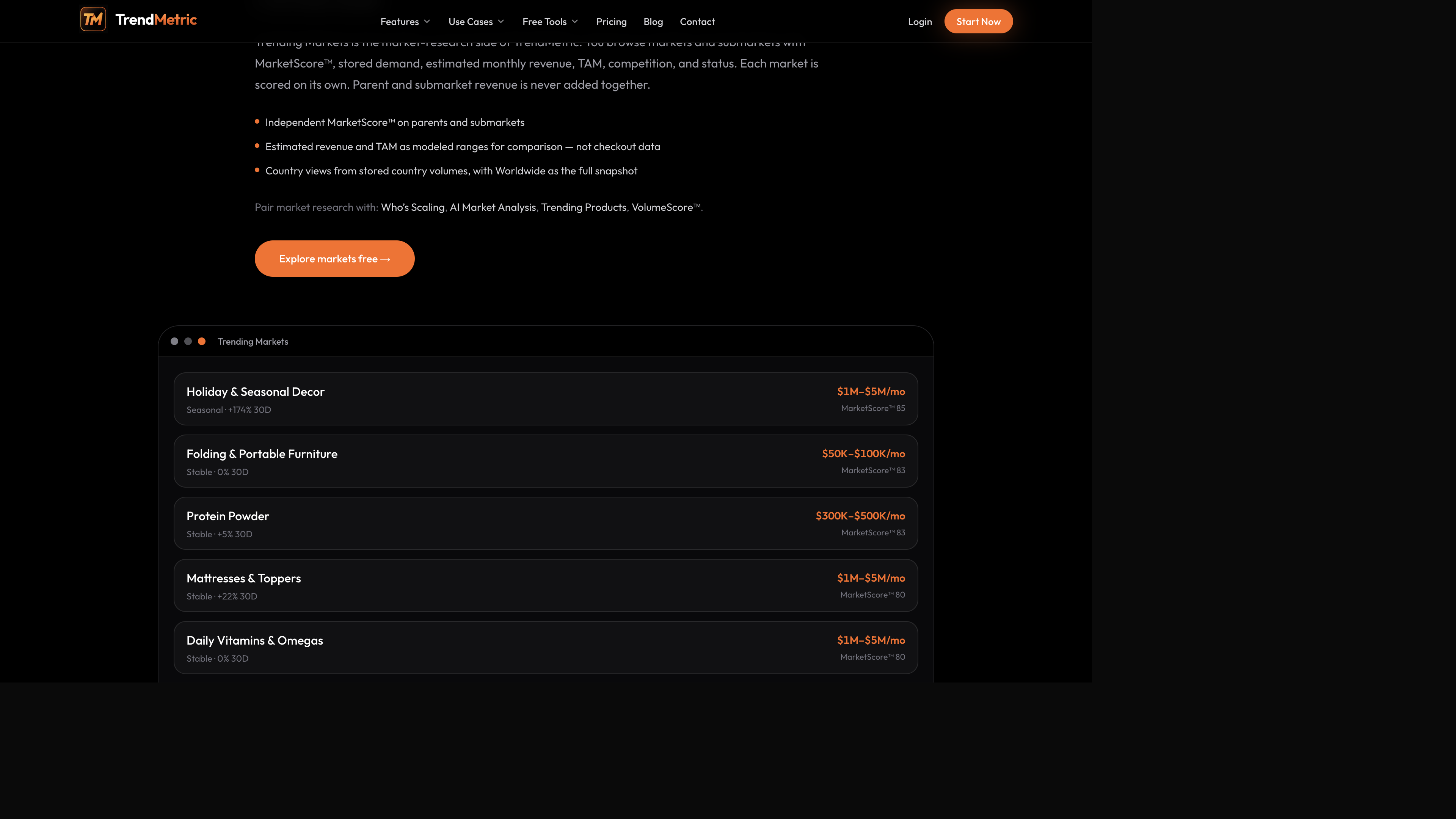
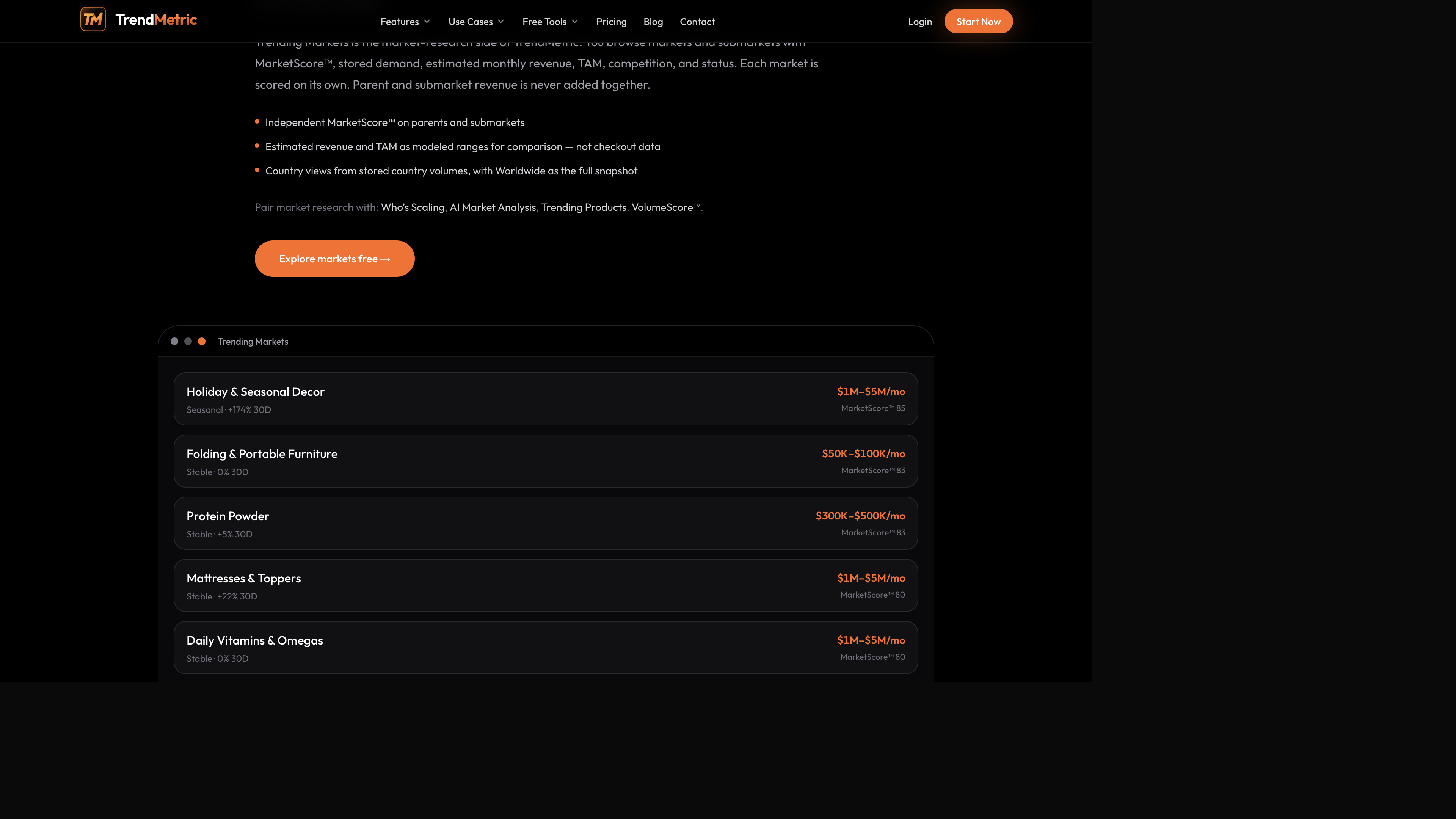
Suppose two briefs land in the same week. One is a parent aisle that already shows a wide modeled revenue band on the market cards — protein powder or a holiday decor category are useful examples of sizable ranges on the Trending Markets preview. The other is a micro niche whose 30D percentage looks enormous because the base was tiny.
On the full board, both can appear. On Who’s Scaling, the micro niche usually fails the revenue floor. That is the point for buyers who have been burned by “hot growth” on a thin series. Treat the micro niche as a test if you run it at all. Do not treat last week’s CPA on that niche as a run-rate.
Holiday decor can look Seasonal and large on the same cards. That is a calendar brief, not a reason to keep spend up in the off-window. Folding furniture can look smaller and still be the cleaner test if crowding is lower. Write the status label next to the revenue range. Status is stored momentum, not a media plan.
What to put in the buyer note
- Market name, parent vs submarket, and the country of the ad account — not Worldwide plus the country added.
- Estimated revenue range, MarketScore™, 30D, 90D, status, and whether Who’s Scaling still lists it.
- SKU VolumeScore™, competition, and trend if you are scaling a specific product.
- Forecast horizon and stance (Scale / Test / Watch / Caution). CPC on the product, if shown, labeled as a research estimate — not a live bid.
The six-pass size check before spend
Use this before you raise budgets, not after creative is already in learning. The point is permission to treat a niche as scale-ready — or an honest Test.
- Open Trending Markets. If the category is not large enough to care about on modeled revenue, stop. A good hook does not create TAM.
- Switch to the country of the ad account. Do not add country revenue to Worldwide revenue. See country vs Worldwide.
- If you have Pro, open Who’s Scaling. Confirm the market still clears the revenue floor and shows positive 30D / 90D momentum. If it disappears, keep the test small.
- Open the catalog SKU on Trending Products. Competition High plus Cooling trend is a reason to keep the test small even if creative is working this week. VolumeScore™ is a research rank, not a green light for CBO. CPC on that product, when it exists, is a research estimate — not the bid you will see in Ads Manager.
- Forecast 30D or 90D on that catalog product (Forecast ranges). If the stance is Watch or Caution, do not treat last week’s CPA as a run-rate. Longer horizons are less precise. Track Forecast is not live.
- Track the market and a handful of products so 7D / 30D has a start date (Track starts the clock). Put the country on the project so the brief does not mix geographies.
AI Market Analysis is a monthly brief, not a spend chat
AI Market Analysis is a structured brief on stored monthly market snapshots: what looks like it is working in the window, where estimated money is concentrated, and which country view is worth opening next. It does not invent missing months, scrape stores hourly, or replace live MarketScore™ in Trending Markets. It is not a prompt box that writes hooks from Meta, and it is not a chat that invents spend.
Ecommerce agencies put the same monthly window in a retainer note so scale recommendations are not just last week’s CPA. If you only want the live ranked list, stay in Trending Markets or Who’s Scaling. The AI window is not a 24-hour crawl of every store.
If a month was never stored, the brief will not fill it in. That is intentional. Do not ask the snapshot to explain a week your ad account just had. The catalog refreshes on its own cadence — about every 12 hours for products — and AI Market Analysis stays on monthly market snapshots. Two clocks. Label them.
What this workspace will not do (on purpose)
- It will not connect to Meta, TikTok, or Google Ads.
- It will not show a competitor’s ad spend. Spy on Store is Coming Soon.
- It will not treat product CPC as your live bid.
- It will not forecast ROAS, CPA, or learning-phase exit.
Creative research stays in your ad accounts. Catalog research stays here. Mixing the two clocks — last week’s CPA versus stored demand history — is how scale memos get written on a thin niche. If the catalog says Caution and the account says cheap CPA, believe both: the cheap week can still sit inside a Cooling series.
After the size check: SKU, range, track
When the market clears the floor, confirm the SKU still has demand. Forecast a short horizon. Track the day you start spending so later change is honest. Optional Tracked emails are opt-in in Settings on a paid plan. Who’s Scaling, AI Market Analysis, and Forecast are Pro — see which plan you need.
How this sits next to public arithmetic
The public ROI calculator and ROAS break-even calculator use numbers you type. They do not read MarketScore™ or Who’s Scaling. Use them after the catalog pass if you need break-even math — not as a substitute for the size check.
If you wanted a creative spy, this page will disappoint you on purpose. Size the market. Confirm the SKU. Forecast a range. Then spend. The use-case page is for media buyers. The demand-first SKU pass, if you still need candidates, is how to find trending ecommerce products.
Related articles
FAQ
- Does TrendMetric connect to Meta, TikTok, or Google Ads?
- No. It is a catalog research workspace. Acquisition, bids, and creative stay in your ad accounts.
- Can I see a competitor’s ad spend?
- No. Spy on Store is Coming Soon. Estimated revenue is a modeled market range, not store-level or ad-account spend.
- If percentage growth is huge, why might I still not scale?
- Who’s Scaling only ranks markets that already clear a meaningful estimated-revenue floor. A large percentage jump on a tiny base is a test, not a scale signal. The ranking is on Pro and Business.
- Is Forecast a prediction of my CPA?
- No. It is a demand range and stance from stored search history on a catalog product or market. It does not see your ads.
- Which plan includes Who’s Scaling and Forecast?
- Pro and Business. Starter has Trending Products and Trending Markets without those two tools. AI Market Analysis is also Pro.